
English source · 26 min
Independent checkout service
The local reference storefront completes a simulated purchase through the independent Checkout service and a separate commerce host. The component plan tracks the shared embeddable UI, provider coverage and hosted acceptance.
Checkout has its own target repository veyndo/checkout, Rust service, HTTP API,
MCP tools, JavaScript/TypeScript client and embeddable checkout UI. It must run
without starting the complete Veyndo product or reading private Core tables.
It must also compose into native Veyndo, Storyfront and external frontends.
Domain ownership
Checkout owns versioned checkout sessions, cart/quote orchestration, progress and customer-facing purchase/recovery state. It consumes explicit ports for catalog, pricing/tax/promotions, inventory/reservations, customer/company policy, delivery, orders/documents, legal context and Payments. These ports may target independently released Veyndo components or another admitted backend. “Standalone” means usable without the whole product, not a checkout that invents catalog, stock or prices.
Keep one owner of every financial/stock/order decision. Checkout must not create a parallel pricing engine, payment ledger, order writer or unreliable browser queue. Existing currency/minor-unit, language/country, B2B approval, Rule/Flow, channel, rights and package-hook behavior remain authoritative through their domain owners.
Commit boundary
The existing native purchase commits order, stock and outbox atomically. Splitting
a process does not turn this into an atomic transaction across unrelated databases.
Define one CommitOrder port whose domain owner retains those writes and replay
receipt in one transaction. In the composed product that remains the existing
commerce owner until its equivalent component is accepted.
External catalog, inventory and order integrations need explicit reservation leases, expiry, idempotency, confirmed outcomes and recovery wherever those operations cross transactional owners.
Checkout may store its own sessions and frozen quote references. Payment intents, provider receipts, captures and refunds stay with Payments. Uncertain provider outcomes are persisted/fenced and recovered; they are never blindly retried. Expected cart/quote versions and current channel/customer/company authority must be rechecked at purchase, not inferred from an earlier UI preview or model output.
Commerce host ports in Core
Core exposes the host operations as a single commerce boundary. Checkout makes one host call for a quote, one for confirmation and a separate receipt call when the original result needs recovering. The normal storefront and Storyfront still reach the same transaction directly.
| Port | Commerce responsibility |
|---|---|
| Quote | Resolve the current buyer and cart, channel, catalogue, pricing, delivery, company policy and legal context. Return the cart revision, amount in minor units, currency scale, country, legal policy version and payment method. The preview reserves no stock. |
| CommitOrder | Recheck the review and buyer in the native transaction. Lock stock in native product order and commit the order, stock allocation, completed cart and outbox event together. The session ID gives the purchase its replay key. An altered review cannot replace an original receipt. |
| Receipt | Read the original order by its indexed shop and purchase key, then check the original cart, channel and current buyer. Only the buyer credential is needed for recovery. A missing receipt is a read result, not proof that an in-flight confirmation failed. |
Core supports the simulated payment method and an explicit PayPal Sandbox profile. Payment attempts, provider callbacks and refunds use the existing Payments owner. The independent Checkout process keeps draft sessions in its own database and uses HTTP for the three Commerce operations. Core requires no new schema or synchronous dependency on that process. If a response goes missing, recover the receipt or retry the exact reviewed purchase with the same session. A new session can represent a different purchase. See the Northflank rollout and public purchase results.
How native and embedded checkout share one order
The normal storefront and the original Storyfront Experience enter Commerce through different screens. Both use the same quote, order and payment owners. The independent Checkout service can use those owners through the commerce host contract below. The public journeys described here use Core directly.
| Step | Normal storefront | Storyfront |
|---|---|---|
| Cart and identity | Storefront keeps the native cart credential in its shop context. | Core issues a short-lived, single-use transfer for the current cart revision and registered parent origin. Consuming it rotates the credential and keeps the cart ID. |
| Quote and legal review | The buyer reviews the native cart revision and total. Commerce calculates delivery, taxes and available methods and resolves the current legal context. | The embedded native checkout uses the same quote and review contract after transfer. Its origin and shop scope are checked before loading. |
| Order and payment | POST /store-api/checkout/order checks the reviewed revision and amount, records the legal snapshot and commits the order, stock and event. A retry with the same purchase key returns the original receipt. |
The embedded form uses that same order endpoint and payment attempt. The handoff does not create another order or payment ledger. |
| Return and recovery | The storefront shows the confirmed receipt and clears its cart view. | The Experience clears its originating bag after it verifies Core's result. POST /store-api/checkout/handoff/recover can retrieve the original result after a lost browser message. A read needs no cart lock. An explicit reopen acquires that lock to fence the older frame. |
| Refund | Studio submits an approved command against the original payment attempt. POST /api/payments/{id}/refund requires payments.manage, explicit approval and an idempotency key. |
The merchant uses the same Studio command for a Storyfront order. The buyer's checkout credential cannot issue a refund. |
The local handoff regression
compares equivalent native and transferred carts in one shop. It rejects a
changed total in both paths and verifies matching quote options, localized line
snapshots and simulated payment state. Each confirmed purchase produces one
order, the expected stock decrement and one order.placed event, including
after a replay. The same suite checks lost messages and concurrent recovery.
See the public browser results
and the separate configured provider acceptance.
A purchase with a separate commerce host
The local reference uses two Rust processes and two PostgreSQL databases. The Checkout service keeps the buyer's draft. The reference host supplies current buyer and cart admission, an exact price in minor units, and one commit for the stock decrement, order and outbox event. The same Rust purchase orchestrator also runs in the Veyndo composition. A host can supply its own rules through the orchestrator's required ports.
| Host operation | What it returns |
|---|---|
POST /store-api/checkout/session-quote |
Current amount, revision, channel and review policy for the buyer's cart. |
POST /store-api/checkout/session-order |
A receipt after explicitly reviewed confirmation. An exact replay returns that same receipt. |
POST /store-api/checkout/session-receipt |
The original receipt for the current buyer and checkout session. The cart credential is unnecessary here. |
The test reads the quote through HTTP and MCP, rejects a changed amount and then sends two confirmed purchases for the last unit. It drops the successful response after commit. After both processes restart, the JavaScript SDK reads the same receipt. One stock decrement, one order and one event remain in PostgreSQL. A revoked buyer can no longer retrieve the receipt.
External reference storefront
The browser calls its own shop server. The server uses the JavaScript SDK to contact Checkout and keeps the buyer credentials on the server. A signed, short-lived approval carries the exact price and revision the buyer reviewed. Checkout uses the independent Rust host for current pricing and the final commit.
flowchart LR
  B["Browser"] --> S["Example storefront"]
  S -->|"JavaScript SDK"| Q["Checkout"]
  Q -->|"Quote, purchase and receipt"| C["Rust commerce host"]
  Q --> D[("Checkout sessions")]
  C --> O[("Order, stock and outbox")]
The browser test reviewed the 25 EUR cart and confirmed once. After the response was dropped, the shopper recovered the original receipt and returned to an empty cart. Reload recovered the same receipt. Desktop and mobile layouts were checked in Chromium. Restarting all three processes also preserved the original receipt, with one stock decrement, one order and one event in PostgreSQL. A changed quote and an altered approval were rejected before an order was written.
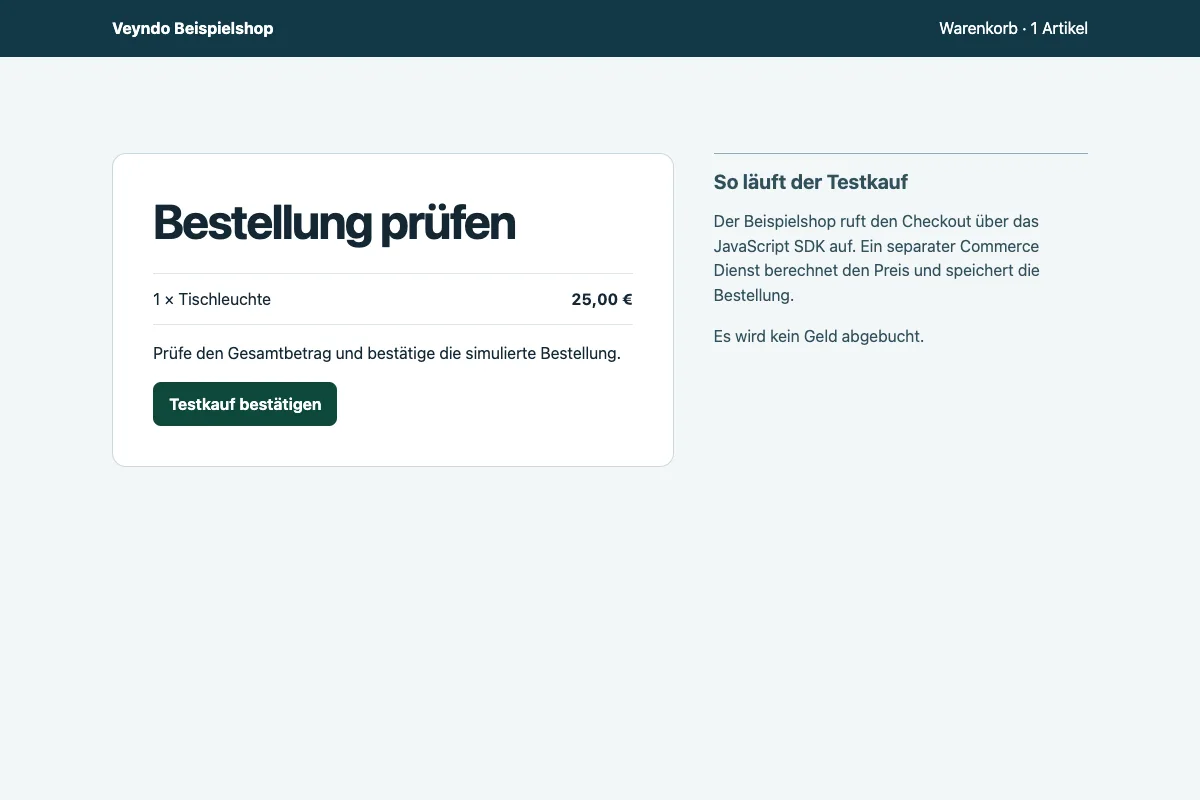
The sample uses a single synthetic buyer and one disposable cart on loopback. The Checkout repository setup guide is available to repository collaborators. Public shop and Storyfront buyers continue to use the integrated commerce paths.
The existing Veyndo composition also passed local purchase, capture and refund with PayPal and Shopware Payments fixtures. Under concurrent catalogue reads, both paths completed 192 quote requests without errors. The local p95 was 43.7 ms through Core and 47.3 ms through Checkout. This run used local PostgreSQL, synthetic identities and the same cart and quote on both paths. Measurement method.
Combine checkout and an installed MCP App
The public Connected Shop example starts a separate Node host. It uses the SDK 0.4.6 catalog client to display a Core product family and the MCP client to load its filterable guide. The Checkout client previews and applies the chosen basket. The shopper reviews Core's total and delivery before confirming through the Store API relay to independent Checkout. If the Core reply is lost, the host looks up the original session receipt.
The local browser test used separate Core and Checkout PostgreSQL databases. Desktop and mobile each completed one simulated purchase of the selected product. Each reduced stock once. On mobile the Core response was discarded after successful confirmation. The host recovered the same receipt, and reload preserved it. A forged product from the iframe and a confirmation from an unrelated browser origin were rejected. Browser verification with SDK 0.4.6.
UI and agent integration
Export the same cart, address, delivery, payment, review and completion controls as an independent application and an embeddable UI. An external frontend supplies its theme and admitted cart context through the shared UI host; Veyndo and the original Storyfront use that same API/UI implementation. Provider-specific hosted fields, wallets, required redirects and authentication remain supported by their actual provider adapters.
An embedded checkout confirms completion only after authoritative server order state. Return navigation and clearing the originating cart use a verified session/ order receipt and scoped message handshake. A browser message or URL fragment alone never proves purchase. Support native and embedded return, refresh/restart, expired carts, repeated callbacks and a stale original cart without duplicate orders.
The hosted release checklist verifies the existing Storyfront path before and after the Core update. The Storyfront recovery contract lets the parent find the original cart when a browser notification is lost. Status reads use the last committed state without locking the cart. Only an explicit reopen takes the same cart lock as purchase and rechecks the recovery key before replacing a transfer. This keeps frequent status reads out of the order write path.
The agent may configure checkout, explain totals, obtain missing data and prepare an action or validated interface. Deterministic controls remain usable when the model is unavailable. Purchase, saved-method consent and financial changes need their actual current user approval and backend checks. Agent-produced totals and payment status are never authoritative.
Current buyer, channel and company authority
An independent Checkout draft carries the reviewed cart and its context. Commerce checks current buyer and channel access on the next call and applies company approval and budget rules inside the existing purchase transaction. A repeat of the approved purchase returns its original order. Reading the receipt still requires the current buyer identity.
| Change in the test shop | Observed result through separate Checkout |
|---|---|
| Approval missing or superseded by a membership change | Purchase declined with no order, stock allocation or Flow job. |
| Buyer removed from the company after approval | Quote and confirmation declined using the original credentials. |
| Channel made private or inactive | The previously reviewed cart could no longer be quoted or confirmed. |
| Budget reduced or whole shop paused | Direct and composed purchases declined before writing an order. |
| Fresh approval after the cart changed | One order, one stock allocation, one completed Flow and a customer-visible invoice. Repeated confirmation returned the original receipt. |
| Customer logged out after purchase | The old customer session could no longer read the receipt. |
The local acceptance used separate Rust processes, signed PostgreSQL access and a synthetic shop. It also exercised a lost confirmation response and capture and refund with local PayPal and Shopware Payments fixtures. The public Storyfront smoke test separately opened the native checkout in 806 ms and read the original open cart in 16 ms. Provider acceptance for the new hosted pair is tracked under CHK-08.
In a paired local comparison with concurrent catalog reads, both paths completed 192 quotes without errors. The p95 was 45.6 ms for native Core and 46.9 ms through the separate Checkout process. Measurement method.
Pause and resume Checkout confirmation
The separate Checkout process has two opt-in confirmation profiles. Set
CHECKOUT_ENABLE_SIMULATED_PURCHASE and
CHECKOUT_ENABLE_PAYPAL_SANDBOX_PURCHASE to false on that process and restart
it to stop admitting new confirmations. Keep the same session database,
identity and commerce origin. Keep Core and its provider workers running.
Checkout hides confirmation from OpenAPI and returns HTTP 503
(purchase_disabled, mayHaveApplied: false) for a blocked request.
Session, quote and receipt reads are available once Checkout is ready.
A response lost before the pause can still belong to an order that Core committed. Look up the receipt with the original session and current buyer. Core continues to reconcile the same payment attempt. After re-enabling confirmation, reuse the original session and purchase identity for a valid review. A new purchase on another route uses a different identity.
The local rehearsal prepared two native carts before the switch. With Checkout offline, Core purchased the first directly and the second through its existing Storyfront handoff. Handoff recovery returned the original order and cart. Core also reconciled an existing PayPal fixture approval during the outage. With confirmations still disabled, Checkout read the captured payment and its subsequent refund. Re-enabling returned the same order and payment attempt and let a retained draft complete. The checks compared order and payment IDs and stock across the switch.
The component plan tracks the hosted routing switch and rehearsal against the configured provider. The local handoff test exercises the Core transfer and purchase API. The external browser example separately verifies return to an empty cart.
In the same local run, both paths completed 192 quotes alongside catalog reads with zero errors. The p95 was 48.8 ms for native Core and 48.2 ms through Checkout. During a separate Checkout stop, 32 native quotes and 32 catalog reads also completed without errors. These timings describe the local fixture.
Required acceptance
- Its own image/configuration/session store, HTTP/MCP contracts and SDK examples.
- Independent external frontend example and actual Veyndo/Storyfront composition.
- Identical domain validation and replay semantics across HTTP, MCP and UI.
- Own/foreign shop/customer/channel/cart cases, paused/private shops, revoked rights, stale versions and B2B budget/approval changes.
- Concurrent purchase, stock contention, recalculation, legal/version receipts, outbox/Flow and document behavior without a second order/stock writer.
- Payment approval/cancellation/unknown outcome, supported methods, callback authentication, return, empty originating cart and refund integration.
- Real reference adapter/database/provider fixtures for automatic tests; configured provider acceptance remains distinct from fixtures and simulated payments.
- Controlled migration of existing routes, cart capabilities, pending payment attempts and receipts, with rollback. Do not invalidate active carts at cutover.
This component uses the common agentic UI contract.
Bind Checkout to a native buyer login
Core can issue a five-minute Checkout grant for a signed-in buyer in a configured live shop. Enable the canary with the following Core settings.
| Setting | Value |
|---|---|
CHECKOUT_IDENTITY_SHOPS |
Comma-separated live shop IDs explicitly enabled for the canary |
CHECKOUT_IDENTITY_KEY |
32 random bytes encoded as unpadded base64url, held only by Core |
CHECKOUT_INTROSPECTION_TOKEN |
Separate random service credential of at least 32 printable characters |
All Core replicas use the same settings. The shop calls
POST /store-api/checkout/session-access using its existing buyer login and the
normal same-origin and CSRF headers for an HttpOnly session. It receives an opaque
access_token. Keep this token in memory and send it as the Checkout service's
Bearer token. For a quote or confirmation, also send it in the service's
x-customer-token header alongside the native cart capability. Receipt recovery
only needs the grant. A new login can obtain a fresh grant for the same buyer and
recover the existing receipt.
Configure the separate service with audience veyndo-checkout and
CHECKOUT_INTROSPECTION_URL=https://<core-origin>/api/identity/checkout/introspect.
Supply the same introspection credential and the exact Core commerce origin.
The native buyer cookie and the encryption key stay with Core. Introspection
and the native checkout ports recheck the original session in PostgreSQL. An
expired, revoked or foreign-shop grant cannot be used to read an account, mint
another grant, or purchase another buyer's cart. Checkout keeps its existing
dedicated draft database.
Route a test shop through private Checkout
Keep the Checkout listener private. Configure the runtime on the two services:
| Service | Runtime setting |
|---|---|
| Core only | CHECKOUT_PRIVATE_ORIGIN=http://veyndo-checkout:8810 and CHECKOUT_IDENTITY_SHOPS with the exact test shop ID. |
| Core only | CHECKOUT_IDENTITY_KEY from 32 random bytes encoded as unpadded base64url. Core uses this key to issue five-minute buyer grants. |
| Core and Checkout | The same CHECKOUT_INTROSPECTION_TOKEN, a distinct random service credential of 32 to 256 visible ASCII characters. Restrict access to these two runtimes. |
| Checkout only | CHECKOUT_AUDIENCE=veyndo-checkout, CHECKOUT_COMMERCE_ORIGIN=https://app.veyndo.ai and CHECKOUT_INTROSPECTION_URL=https://app.veyndo.ai/api/identity/checkout/introspect. |
| Checkout only | CHECKOUT_ENABLE_SIMULATED_PURCHASE=true for the initial demo purchase. |
Checkout calls the exact HTTPS Core destinations. The service authenticates introspection with the shared credential and Commerce requests with the buyer grant. Northflank service variables take precedence over inherited group values, so verify that both processes resolve the same credential before testing.
Start Checkout and confirm its private readiness before starting Core with the
test shop enabled. An unauthenticated POST /store-api/checkout/independent/create
with an empty JSON object should return 401 for that shop and 503 for a
different shop outside the allowlist. This checks the boundary without a
purchase. A signed-in test buyer can then verify that the cart advertises
same-origin and that the confirmation uses the independent route.
Both the shop and the Storyfront iframe use two same-origin Store API calls. Core validates the existing buyer session and relays the request using a short-lived grant. The browser keeps its native cart capability and sees neither the grant nor the private service address.
| Browser operation | Private Checkout operation |
|---|---|
POST /store-api/checkout/independent/create |
POST /v1/sessions |
POST /store-api/checkout/independent/confirm |
POST /v1/sessions/confirm |
Review a cart change from the SDK
Install SDK 0.4.6 to
use the Store API cart from @veyndo/sdk/checkout. Call cart.create once
and use the returned token to read the same cart or add line items. To
replace its contents, pass the complete proposed basket and the current
revision to cart.preview.
import { createCheckoutClient } from '@veyndo/sdk/checkout';

const checkout = createCheckoutClient({
  baseUrl: shopOrigin, shop, channel: salesChannel, locale, currency,
});
const buyer = { customerToken };
const cart = await checkout.cart.create({}, buyer);
const access = { ...buyer, cartToken: cart.token };
const items = [{ id: productId, quantity: 1 }];
const preview = await checkout.cart.preview({ items, revision: cart.revision }, access);

// Display the returned price, shipping cost and delivery date.
// Apply the proposal only after the buyer accepts it.
const reviewedCart = await checkout.cart.apply({
  items, revision: preview.revision, review: preview.review,
}, access);
The preview leaves the basket as it was. Core returns HTTP 409 if the
revision or reviewed quote changed. Read the current basket with
cart.read(access), request a new preview and show it to the buyer.
Use the returned cart and total to start the checkout session below.
Build the checkout address form with the SDK
SDK 0.4.22 adds checkout.addressOptions(access). Use it to load localized
countries and regions for the current sales channel, together with the
shipping and payment candidates. The country and region lists include the
shop's own geography definitions. Use the displayed label in the picker and
submit the region code as countryStateId.
Use the current cart and buyer context to load the candidates. If
requiresRegion is true, collect a region before calling checkout.select.
Core validates the address and methods and returns the current quote.
TypeScript example.
Choose shipping and payment from the SDK
Read the configured countries, shipping methods and payment methods with
checkout.options(access). Pass the buyer and cart tokens through access
to use the current cart's currency and buyer context. These are candidates.
Core checks whether the chosen combination is available for this cart.
const options = await checkout.options(access);
const methodsForCountry = options.shipping.filter(method => method.countries.includes(country));
// Show the buyer the methods and collect an explicit choice.
const selected = await checkout.select({
  revision: reviewedCart.revision,
  checkout: {
    ...reviewedCart.checkout,
    country, shippingMethodId, paymentMethodId, address,
  },
}, access);
console.log(selected.price.totalMinor, selected.shippingCosts.totalPrice, selected.deliveries);
Use the cart revision from the last cart response. The revision in
options belongs to shop configuration. If Core returns HTTP 409,
reload the cart before trying a selection again. Show the buyer the
updated amount and delivery estimate, then create the checkout session
from the returned cart.
Apply a coupon or switch the cart currency
SDK 0.4.19 exposes checkout.cart.setCoupons({ codes, revision }, access)
and checkout.cart.setCurrency({ currency, revision }, access). Each call
returns a new server-priced cart. Use availableCurrencies to populate the
picker, discounts to show promotions that actually applied, and
price.totalMinor and price.currency to show the new total. An empty
codes array removes the current codes.
Keep the returned revision for the next change. If a change conflicts with a newer revision, reload the cart. Rebuild the checkout draft from the new quote and ask the buyer to confirm that amount. SDK example.
Show checkout documents and record acknowledgement
SDK 0.4.21 exposes checkout.legalPolicy() for the current sales channel's
public documents. Show the applicable text in the buyer's language and keep
its policyVersion with the displayed quote. The cart's legal flags show
whether strict checkout is enabled and whether Core requires a separate
decision for immediate digital delivery.
After the buyer actively accepts, call checkout.acceptTerms with the
displayed policy version, terms: true, the separate digitalImmediate
choice and the current cart access. Then submit the reviewed purchase.
On HTTP 409, reload the documents and quote and ask the buyer to review them
again. Core stores the accepted version with the order.
SDK recipe.
Use the Checkout relay from the SDK
With SDK 0.4.17, checkout.prepare(cart, { requestKey, customerToken })
builds the draft session, the confirmation fields and the original receipt
lookup from the signed-in buyer's reviewed cart. Show the buyer the current
cart before calling checkout.confirm with explicit approval. If the
confirmation response is lost, use the returned receipt lookup.
SDK recipe ·
Connected Shop example.
Install the SDK 0.4.6 archive
to use @veyndo/sdk/checkout. The client uses the two relay routes above and
Core's original receipt lookup. Start with an admitted shop, a current buyer
and a cart whose checkoutService.transport is same-origin.
import { createCheckoutClient } from '@veyndo/sdk/checkout';

const checkout = createCheckoutClient({ baseUrl: shopOrigin, shop });
const buyer = { customerToken };
const session = await checkout.create({
  requestKey, expiresIn: 3600,
  context: {
    cart: { backend: 'native', id: cart.id, revision: cart.revision },
    salesChannel, environment: 'live', locale: cart.locale,
    currency: cart.price.currency, country: cart.checkout.country,
  },
}, buyer);

// Run after the buyer has reviewed the current cart and confirmed the purchase.
const order = await checkout.confirm({
  id: session.id, revision: session.revision, confirmed: true,
  totalMinor: cart.price.totalMinor, country: cart.checkout.country,
  paymentMethod: cart.checkout.paymentMethodId,
  legalPolicyVersion: cart.checkoutService.legalPolicyVersion,
}, { ...buyer, cartToken: cart.token });
If the confirmation reports an unknown outcome, check the existing order
with checkout.receipt({ sessionId: session.id, cartId: cart.id, customerId }, buyer).
Save those references before dispatch. A receipt lookup returns the original
order when available. A 404 means Core has no receipt for that buyer and
session at the time of the check. The lookup never submits a purchase.
The draft result has commerceValidated: false. Confirmation returns the
session and order IDs. The lookup also returns the matching cart and buyer IDs.
For a same origin browser with a buyer session cookie, set
credentials: 'same-origin' and omit the explicit buyer token.
Connected Shop
shows a full review and confirmation flow in an external host.
Read the payment status after returning
When confirmation or recovery includes a paymentAttemptId, SDK 0.4.23
can read the attempt with checkout.payment.status(attemptId, access).
Keep the original cart token across the provider return. The receipt lookup
uses the buyer and session, while the payment belongs to that specific cart.
Use the returned payment state, approval link and settled amounts to show
what the buyer can do next. After provider approval, call
checkout.payment.reconcile(attemptId, { requestKey }, access). Core checks
the payment with the provider and can capture a verified approval. Retry an
uncertain response with the same request key. Read status again to see whether
the payment settled. Core owns payment state and Checkout retains its
existing receipt lookup.
SDK recipe.
Place an invoice order with the SDK
SDK 0.4.25 can submit a native order with
checkout.place(reviewedCart, { requestKey, confirmed: true }, access).
After the buyer approves the review, the SDK passes the cart revision,
exact total, currency and request key to Commerce Core. If the response is
lost, replay the same review with the same key and original cart access.
Show bank transfer details for invoice payments
Read the resulting payment attempt ID in order.payment.attemptId and call
checkout.payment.instructions(attemptId, access) for the buyer's original
cart. The result distinguishes payment methods that offer no bank details,
details that are still pending and details ready to display.
When available, show the verified recipient, bank details and payment reference with the amount and currency from the response. Label simulated details as test data. Read payment status separately to see whether the invoice has been settled. SDK recipe.
Capacity and deployment
The relay has eight concurrent slots per Core process and at most four per
shop across Core replicas, capped by the existing shop limit. A burst can
wait up to 300 ms for a local slot, with at most 16 waiters per process and
eight per shop. A lower configured shop limit also reduces its queue. While
waiting for a local slot, requests hold no database lease. Core normally
releases the cluster lease before the next local request takes the slot.
A full queue, elapsed wait or refused cluster lease still returns the
explicit pre-dispatch refusal with Retry-After: 1.
Checkout's Commerce callbacks have their own request capacity. The authoritative order, stock and outbox commit stays in Core.
The canary applies to signed-in consumer carts in the named live shop using
simulated payment or an explicitly admitted PayPal Sandbox account. Guest
purchases, live payments and saved funding use the native path. Remove the
shop from CHECKOUT_IDENTITY_SHOPS to return its next cart read to native
checkout. An uncertain confirmation must still be reconciled through the
original cart and order before attempting a new purchase.
The direct browser option remains available for a Checkout endpoint that is
intentionally public. Set Core's CHECKOUT_BROWSER_ORIGIN and add the exact
shop and iframe page origins to the service's CHECKOUT_ORIGINS. When both
options are configured the browser uses the private relay.
With both fixture services and the built storefront running locally, set
BASE_URL, CHECKOUT_TEST_SERVICE_URL and CHECKOUT_BROWSER_MODULE to the
Core URL, Checkout URL and local Playwright module. Set
CHECKOUT_TEST_TRANSPORT=same-origin to exercise the private relay. Run
node scripts/testing/checkout_browser_route.mjs against disposable databases.
It drives the actual shop on desktop and mobile. The mobile case drops the
confirmation response after the service commits and verifies one stock
decrement, the original receipt after reload and an empty bag.
Storyfront composition and hosted rollout
On 9 November, local Chromium used the Storyfront checkout controller and cart
persistence from a57ed0e in a fixture page with separate HTTPS origins for
Storyfront, Core and Checkout. The fixture transport used Storyfront's Commerce
client against real Core and Checkout processes with separate PostgreSQL
databases. The original checkout form accepted a signed-in buyer inside its
iframe and used simulated payment. Core kept the order and stock transaction.
| Case | Result |
|---|---|
| Desktop, normal return | RAC-bca1a7a5 confirmed. The parent closed the iframe and the empty bag survived reload. |
| Mobile, response and iframe completion message dropped | RAC-c913056e recovered from Core. Both confirmation attempts returned the same order. The parent verified the receipt and the empty bag survived reload. |
Each case produced one order, one stock decrement and one order.placed
event. The fixture ran the Storyfront checkout path without starting the full
Experience deployment.
Northflank deployed Experience image guided-eggs-5114 from 465f0a9
with original Storyfront a57ed0e. The persistent volume required the
previous replica to stop before the new one became ready. The public health
endpoint temporarily returned 503 during that handover. The new replica
reported storyfront-native and passed readiness with zero restarts.
In the public Lumen test shop, closing the native checkout iframe before
placing the order left the demo lamp in the original bag. Reopening loaded
the same item. The simulated purchase RAC-2d6858a4 for EUR 59.90 returned
to Storyfront, and the bag was still empty after a full reload. This test used
the existing Core checkout. A fresh Chromium session then discarded the
iframe's completion message on purpose during simulated order
RAC-e2a6e476. Storyfront recovered the receipt from Core on return, sent no
second order request and retained the empty bag after reload. The local
response-loss and provider fixture results remain separate from hosted
independent Checkout and PayPal acceptance.
Northflank runs Checkout image puffy-soup-2325 from eaa34f2 with one
ready private replica on port 8810. The dedicated database and login passed
the scope and permission checks in the
Checkout service guide.
The runtime cannot read the signing key. The maintenance job's temporary
administrator connection and access to Checkout's runtime secrets were removed
after installation. The HTTP /ready probe verifies the service can establish
a signed database scope.
Hosted Lumen pilot, 10 November 2026
Northflank runs one ready private Checkout replica. Core relays signed-in
consumer checkouts using demo payment and the configured PayPal Sandbox method for
lumen-story-lab-15-o-98aa4751fa. Both runtimes inherit
CHECKOUT_INTROSPECTION_TOKEN from one restricted group. Core inherits
CHECKOUT_IDENTITY_KEY from its own group. The Checkout service has no
local override for the shared credential.
| Hosted check | Observed result |
|---|---|
| Lumen without buyer authentication | HTTP 401 from the independent create route. |
| Shop outside the allowlist | HTTP 503 from the independent create route. |
| Original Storyfront iframe | Independent create and confirm both returned HTTP 200. Order RAC-694ba533 cost EUR 59.90 with demo payment. The bag stayed empty on return and after a full reload. Stock moved from four to three. |
| Native Store API | A second demo purchase and its repeated confirmation returned the same order ID. Stock moved from three to two. The completed cart retained its receipt line item. |
The native browser and original Storyfront iframe also completed Shopware Payments PayPal purchases with the actual provider Sandbox. Each capture was EUR 59.90. Both browsers used same-origin independent create and confirm. The native cart was empty on return. The Storyfront bag stayed empty after return and a full reload. The order and capture events reached their default Flows in production. Those Flows wrote notes for both orders.
Studio refunded the original native order RAC-a31ce698 and the original
Storyfront order RAC-2e7cfc2a. Each EUR 59.90 refund completed in PayPal
Sandbox and its original payment showed refunded. A separate native demo
payment created order RAC-7048dee8. Its order Flow generated invoice
INV-00000001 automatically. A repeated confirmation returned the same
order and stock moved once, from one to zero.
The two Sandbox orders use reserved example.test buyer addresses. The
Email Delivery app is installed in Lumen and sending is disabled pending
sender and transport configuration. Hosted verification still needs one
paid order with a matching Flow, invoice, Connector receipt and message
in a reachable mailbox. Production concurrency has its own load check.
Implementation plan.
Recover a busy browser checkout
Core marks a request it refused before forwarding it to Checkout with
429, Retry-After: 1 and X-Veyndo-Checkout-Admission: refused. The native
storefront and the embedded Core checkout can repeat that same request once
after a second, while the buyer session and page are unchanged. The order
confirmation keeps the original draft, cart and reviewed amount.
Before forwarding a confirmation, Core can wait up to one second for a free
relay slot. Set CHECKOUT_RELAY_CONFIRM_WAIT_MS to an integer from 1 to 1500
to tune that wait. Creating a session still waits at most 300 ms. The number
of concurrent requests and waiting callers stays bounded. The queue does
not hold a database lease.
In the instance diagnostics under /api/runtime,
checkoutRelayRejections separates a full local queue, an expired local
wait and an exhausted cluster quota. Use the change in each counter over
the test interval to identify why Core refused requests.
A lost response or an error without this marker uses the existing completed cart lookup. The browser checks for the original order before the buyer can try again.
The local Chromium test sends a marked refusal at desktop size and discards a real confirmation response at mobile size. Both journeys commit one order, decrement stock once and show the same receipt after reload. Returning to the shop shows an empty cart.
PayPal Sandbox through the separate service
Set CHECKOUT_ENABLE_PAYPAL_SANDBOX_PURCHASE=true on Core and Checkout only
for the named test shops in CHECKOUT_IDENTITY_SHOPS. This flag is off by
default. Install Shopware Payments, connect its Sandbox account and enable
PayPal for the test channel. The native browser route reads the selected
account's environment from the existing payment-method lookup and uses the
separate service for a new PayPal payment. The service returns a reference
to the original payment attempt. The existing Core payment screen, worker
and merchant refund API use that attempt.
The Commerce transaction rechecks the selected provider and the locked account environment before committing the order. A switch to Live after review rolls back the order, stock allocation and payment job. A lost reply can be recovered through the original receipt. Checkout owns no provider credentials or payment state. The built-in PayPal Sandbox method can also use the explicit service API.
To repeat the local provider-contract test, build Core and Checkout and
provide a fresh local PostgreSQL database. Set CHECKOUT_REPOSITORY to the
Checkout repository, BASE_URL and BIND_ADDR to an unused loopback
listener, and DATABASE_URL and MERCHANT_TOKEN to disposable test values.
The local PostgreSQL user must be able to create a database and role for Checkout.
Set CHECKOUT_TEST_BINARY if the Checkout binary uses a custom build
directory. Run python3 scripts/checkout_sandbox_composition.py.
The test races two buyers for the final unit, drops the response after commit and recovers the original payment attempt. It checks that an unverified return cannot capture funds, then exercises approval, capture and merchant refund using local provider responses. It also verifies the switched Live account denial.
The browser test also runs with the local provider fixture. In the disposable
atelier shop, install Shopware Payments, connect the contract-fixture
account and enable PayPal. Configure the private payment adapter with the
loopback URL from paypal_fixture("atelier", "https://provider.veyndo-test.local"),
its fixture token and approval origins https://provider.veyndo-test.local and
https://www.sandbox.paypal.com. Enable the Sandbox confirmation flags on
both services. Pass the fixture's loopback URL as CHECKOUT_TEST_PAYPAL_FIXTURE
and the disposable Core merchant token as CHECKOUT_TEST_BROWSER_MERCHANT_TOKEN
when running scripts/testing/checkout_browser_route.mjs. The browser serves
the test frame from the loopback fixture and blocks navigation to PayPal.
On 9 November Chromium completed approval, capture and full refund on desktop and mobile with the original attempt. The mobile run lost the confirmation response. A separate local run used Storyfront's checkout controller and recovery client with that same fixture. Closing the iframe during payment preserved the bag and reopened the original order. After verified payment, the bag stayed empty across reload. Dropping both the confirmation response and the browser message still produced one order and one stock decrement. The hosted Lumen pilot then completed both the native and original Storyfront browser purchases with PayPal Sandbox, including return, empty carts after reload and refunds. The hosted paid-order path through invoice and external mail delivery remains open. Hosted evidence · Acceptance order.