
English source · 11 min
Customer scenario simulator
Test a private shop change with a small group of fictional customers. Give them a shopping goal, adjust their budgets and languages, and inspect what actually happens in native search, the basket and simulated checkout.
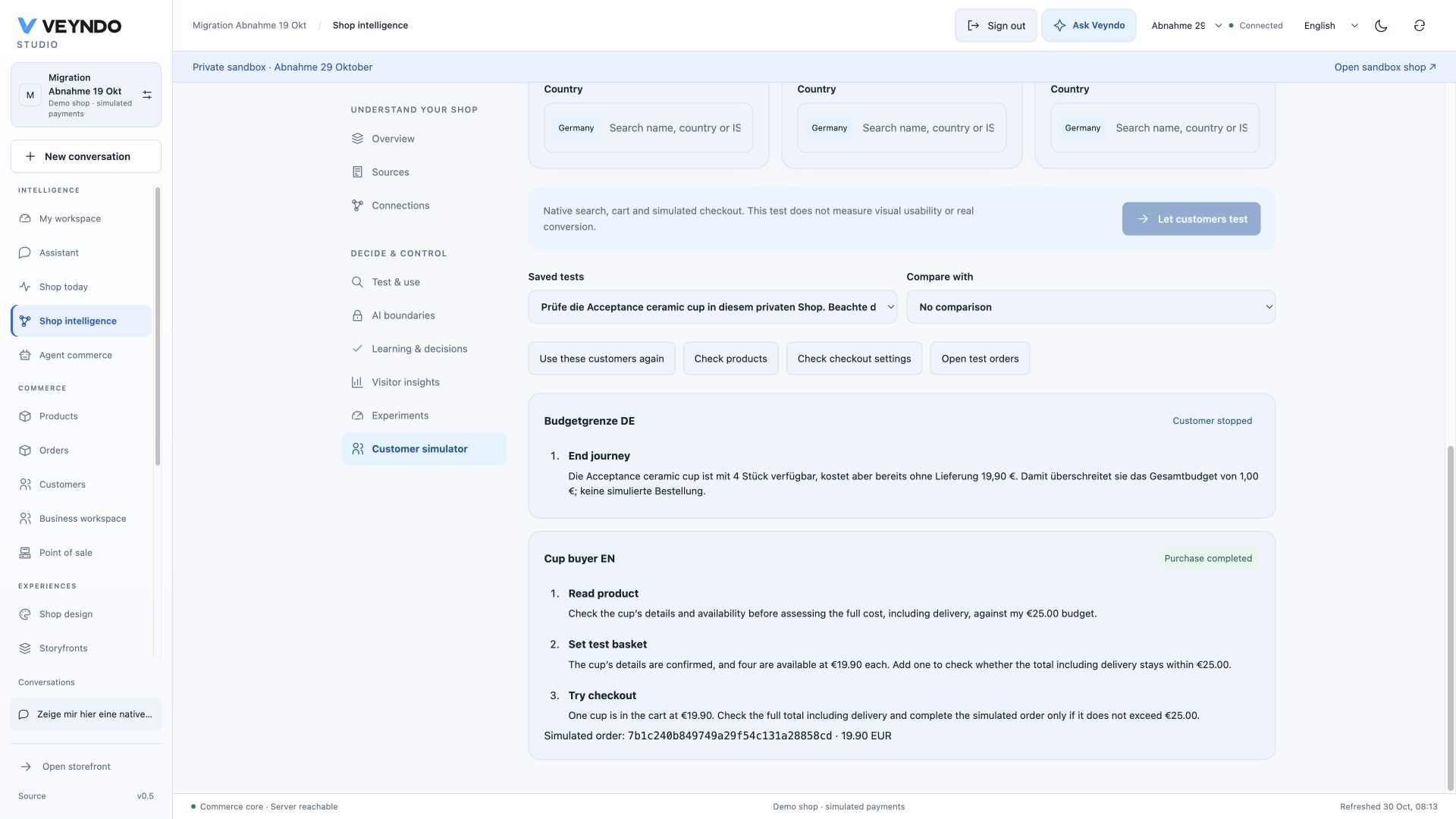
Interface capture from 30 October 2026. Earlier public profile-suggestion outcomes remain linked as dated evidence below.
Try it
- Open a private sandbox and save the product, rule, app or channel changes you want to test. The live shop remains outside the simulation.
- Open Shop knowledge → Customer simulator. You can also enter from Shop design, the current App Studio sandbox, or a migration's private target.
- Describe a concrete goal, for example: “Find a desk lamp, read its product information and buy only if the final price fits your budget.”
- Choose Test customers from my catalogue, review the three suggestions and adopt them, or edit the initial profiles manually. Keep one to six customers; their names, goals and budgets remain editable. Languages, countries and currency come from the selected shop channel.
- Start the test. Up to two customers progress concurrently. Each gets its own native basket, bounded model calls and a saved action journal.
- Inspect the results. A purchase has a real private, simulated order ID and native total. A failed budget, stock or shipping check has an observed error. The customer's explanation is shown separately from that native result.
- Open products, checkout settings or test orders directly to investigate. Choose Use these customers again, save the intended change and repeat. Compare the two saved runs without manually re-entering the profiles.
The model receives the current channel's bounded catalogue sample and can search for more products. Profiles are fictional test instructions, not inferred people or a claim about the shop's actual customer demographics. No real customer data is needed. You may use any enabled content language for a profile; the workbench controls are available in English, German, French and Spanish.
Start from the selected catalogue
Choose Test customers from my catalogue to review three editable suggestions before adopting them. They use a bounded sample of up to twelve visible products from the selected private channel, with the native localized names, stock and minor-unit prices. This is not a claim that the sample represents a large catalogue or actual customer demographics. An empty sample keeps manual profile editing available.
- A price-conscious customer deliberately has one minor unit less than the sampled product price, with a minimum budget of one minor unit, to exercise the native budget guard where the product price permits it.
- A first-time visitor checks product information and has a suggested 20% price allowance. A second enabled content language is selected when available.
- A focused buyer checks the highest sampled price point and a second enabled destination when available. Out-of-stock products stay testable.
Review the names, goals, budgets and countries, then choose Use these suggestions. Your overall task stays unchanged; adopting profiles does not start a run or replace saved results. All profile fields remain editable before Let customers test.

The suggestion preview uses no customer records and makes no additional model call. Studio may stay in your interface language even when the chosen channel serves a different language. Profiles use only that channel's enabled shopper languages; its type, activation and ordinary native shopper admission still apply. The existing AI shopper tasks make their own bounded decisions only after explicit start; actual checkout totals, shipping, tax, availability and exact budget enforcement remain native. A suggested 20% allowance is not a calculated delivery quote.
A channel switch discards the previous channel's sample and edited draft. If the
shop main language is excluded from this channel, profiles use an enabled channel
language. Currency scales of zero, two and three digits keep their native minor units.
The same sample is available through HTTP and MCP merchant.scenario.list under
the existing private-sandbox and catalogue/order rights.
In the public 22 October acceptance, a German Studio prepared a French-only notebook channel. The EUR 28.89 profile declined the EUR 28.90 notebook; the two EUR 34.68 profiles completed native simulated orders for Germany (EUR 28.90) and Austria (EUR 29.14). Reload retained both orders and their journals; Use these customers again restored the exact original task and profiles without starting another purchase. Exact deployment and browser evidence.

What a comparison means
Matching goals, profiles, inference selection, channel and currency are identified by a shared comparison digest. Each customer also records its starting observed catalogue, settings/revision and installed app/rule/flow/promotion/channel version stamp. Pending snapshots remain pending; they are not reported as shop changes.
A changed snapshot is a useful diagnostic, not a controlled experiment. These are sequential runs in a working private shop. Earlier test orders consume private stock, other sandbox edits may occur, and model output may vary. Use equivalent starting conditions when comparing a change and read the individual actions. There is no conversion forecast or causal revenue estimate.
The 29 October local browser acceptance reuses two exactly saved profiles before and after a private stock repair, then separately inspects the rendered product, completes a German simulated purchase and verifies return with an empty basket. Its screenshots are actual browser captures. Native AI shopper execution and rendered browser acceptance are recorded separately; the native task journal is not a browser recording.
This version exercises the native commerce API. It does not render the shop, judge a screenshot, click a mobile UI or run an authenticated company-buyer journey. A design change still needs browser testing. The simulator can already find native catalogue, price, stock, country/shipping and purchase failures beneath that design.
Testing an applied agent proposal
In a private sandbox, an applied proposal offers Customer simulator. It opens
the existing simulator on the proposal's channel. Starting a test optionally sends
sourceTaskId; the server resolves its owning actor, agent identity and current
permissions, applied state, revision and proposal digest. It rejects another
customer test, an unapplied proposal, another actor or another channel. The worker
rechecks that reference before and after inference and before completing its report.
A changed proposal stops subsequent actions; it does not undo a prior private order.
The reference is visible in setup and each result. Test without this reference starts an independent test and retains the edited customer brief. Repeating saved customers restores their original reference, rather than attributing an old test to an unrelated currently open proposal. A proposal reference identifies the origin of a test; it does not establish that every original edit is still present.
Each new run also hashes the existing staging configuration projection at start and finish. Status compares that finish against the current private configuration:
| State | Meaning |
|---|---|
current |
Start, finish and current publishable configuration match. |
changed_during_run |
The start and finish configurations differ. |
stale |
Start and finish matched, but the configuration has since changed. |
unverified |
A complete start, finish or current comparison is unavailable. |
This uses the release owner's projection, including design, rules and permitted
app configuration. Orders, inventory movement, secrets and operational app records
remain outside that projection. Ordinary test purchases therefore do not make the
configuration comparison stale. Capture is bounded to three seconds, with a short lock wait. A large release
projection, busy configuration or unavailable comparison leaves the native journey
and saved report intact, with unverified evidence. No partial digest is accepted.
Only the digests are stored in the existing task
checkpoint/report. This is a boundary comparison, not a frozen test environment:
a change that is made and reverted entirely between the two captures is not detected.
It also does not certify rendered UI or grant release authority.
Resume and control
Runs reuse Veyndo's durable agent tasks and inference accounting. Leaving Studio or reloading does not restart a customer. Choose the saved test to inspect it again. An interrupted or uncertain model call requires explicit continuation. A confirmed order is recovered after a lost response instead of purchasing a second time.
Each customer has at most eight actions. Stop an individual run in its result card; the shop's existing emergency stop and identity revocation apply to all runs. Stopping prevents subsequent mutations, including a checkout waiting on a database lock. It does not silently undo an already completed private order.
The native engine checks the exact total against the budget. Model input carries an explicit decimal amount and currency so that 100 cents is presented as EUR 1.00. Even an incorrect model decision cannot authorize spending above the profile limit.
Apps, migration and publication
The scenario uses the currently installed apps in the selected sandbox through normal native commerce operations. Install a saved app version there before testing; opening a test does not activate an old build. App-owned code stays in its package.
Migration opens the same simulator for its authorized private target and channel. Imported products and configured rules therefore use the same cart and checkout owners as other products. Publication remains a separate, selected staging review. In Staging & releases, choose a private sandbox and a saved customer test. Its observed steps, simulated order and current configuration comparison appear beside the native changes. Refresh tests and configuration check reads the saved result again; it does not run another purchase. Open this test and repeat returns to the same sandbox, sales channel and saved report, where you can load its customers and start a new test. A failed read or navigation shows a retry message.
Only users with every scenario permission see this panel. Changing sandbox or request scope immediately removes old selections/results; the backend remains the authority for actor-private access and digest-bound publication. A successful customer test never grants publication rights or publishes a package. The report covers native Commerce API behavior, not rendered page layout or every selected release item. Inspect those changes and use the existing preview before publishing.
The native acceptance connects a reviewed price proposal, its private customer purchase and selective publication in one run. The live product adopts the reviewed price; test orders, stock and unselected changes stay in their existing scope. Outdated or repeated selections and revoked publication rights reject. This checks the real Rust/PostgreSQL path with a deterministic model response. The separate browser acceptance signs into Studio, opens that saved test in its original private context, returns to the release view and publishes the selection. The publication history survives reload; the native live price reflects the change. Exact scope and evidence.
See App Studio, migration, shop design and recorded rule comparison for the adjacent workflows.
Shared contract and isolation
| Operation | HTTP | Purpose |
|---|---|---|
merchant.scenario.create |
POST /api/agent/scenarios |
Idempotently enqueue one to six profiles in a private environment. |
merchant.scenario.list |
GET /api/agent/scenarios |
Actor-private history and selected channel configuration. |
merchant.scenario.status |
GET /api/agent/scenarios/{id} |
Current saved observations and customer task states. |
MCP and HTTP share the capability registry and handlers. Existing
merchant.run.cancel / merchant.run.resume operations control the individual
tasks using current revisions. Required rights are assistant.use, catalog.read,
channels.read, environments.manage, orders.read, orders.write and
knowledge.read. App principals cannot start these merchant simulations.
The server rejects live shops and personal read-only previews, verifies sandbox membership, current original scopes and the owning agent identity, and keeps reports actor-private. Model tools are a closed shopper action set: search, detail, add, checkout and finish. Merchant mutations, arbitrary URLs and credentials are absent. The existing stage restrictions prohibit real payment/provider egress. Reports and prompts never contain cart capabilities or provider credentials.
src/agent_runs/scenarios/ owns only the cohort and shopper adapter. Native commerce
owns calculations, inventory, legal acknowledgement, idempotent orders and app
hooks. PostgreSQL tasks, the existing checkpoints, quotas and worker leases own
execution; there is no new queue, table per app, payment implementation or Python
production worker. The prompt is registered as customer-scenario@1 with its hash.
Verification
Local regression uses the actual Rust server and isolated PostgreSQL with controlled provider responses: private admission, two concurrent customers with a two-connection pool, exact budgets, injection rejection, multi-product baskets, stock failure and repair, lost-response cold restart, cancellation while checkout waits on a product lock, lease expiry while waiting on the task lock, revoked rights and emergency stop. The same native path is also checked with separate restricted database connections.
Browser acceptance and actual-model observations are recorded separately in the scenario evidence. Current status remains authoritative for public delivery.
Public follow-through on 29 October
The configured public model ran two saved fictional profiles in a fresh private sandbox. A EUR 1.00 German buyer stopped at the actual EUR 19.90 product price; a EUR 25.00 English buyer read details, built the basket and completed one simulated purchase. Full reload and selecting the saved test retained both outcomes and the same order reference. Exact steps and screenshots.
Inspect the shop before publication
In Staging & publications, choose the private environment and a saved customer test. Preview shop rechecks access to that exact report and opens the current native storefront in the selected profile’s channel and content language. For a report with several customers, choose the profile before opening.
Switch the preview between desktop and mobile widths, follow product links, or open the shop in another tab. Recheck and reload retrieves current configuration freshness and reloads the shop. Closing, changing profile or changing report/scope removes the previous frame and discards late responses. Native shop admission and browser sessions remain responsible for access. Credentials are never placed in the preview URL.
The preview shows the current sandbox. It is not an archived rendering or an automatic browser test; saved API observations remain separate. Country, currency and customer account are chosen in the storefront itself. Reviewing this preview does not publish anything or automatically place an order. Continue with the existing change selection and explicit publication after inspection.
Native preview screenshots and acceptance.
Saved tests and public preview acceptance
Saved-test selectors distinguish repeated titles with a localized date and a short run ID. Starting or selecting a test retains its ID and channel in the current Studio link, so reload returns to that result. Rejected starts retain the current link and edited brief; late responses from a previous sandbox cannot change it.
The 30 October hosted release preview completed a simulated cup purchase, returned to the collection and showed an empty basket. Public walkthrough and screenshots. This native interactive preview is available beside publication review. The agent's existing automatic test execution still uses the Commerce API; automatic rendered browser recordings are the next separate implementation item.